Guided installation
System, disk, network, and port pre-validation; installation and tuning of Koha, MariaDB, Apache, Memcached, and Plack, plus SWAP, NTP, and timezone.

koha.nexus is a smart, free, and easy-to-use assistant for installing, configuring, maintaining, and extending the Koha Integrated Library System via a friendly and guided dashboard.
$ wget https://raw.githubusercontent.com/PauloFBaldiFH/koha.nexus/refs/heads/main/installer$ sudo bash installer KOHA.NEXUS✓ Validating server...✓ Installing Koha✓ Configuring database✓ Preparing backups✓ Configuring access → Dashboard ready: sudo config.sh
From the initial installation to backups, indexing, security, migration, cataloging, and web publishing, the core features are gathered in a single control point.
System, disk, network, and port pre-validation; installation and tuning of Koha, MariaDB, Apache, Memcached, and Plack, plus SWAP, NTP, and timezone.
Compressed SQL backups, MARC21 exports, a restore test, and cloud copies on Google Drive, OneDrive, MEGA or S3, set up step by step.
Backups are validated and tested in a temporary database before any replacement of the current catalog.
Switch between Zebra and Elasticsearch 7, indexer watchdog, and tools for index repair and rebuild.
Cloudflare Tunnel without needing to open router ports, Certbot for SSL, and Google Search Console assistant.
Fail2ban, UFW firewall, options to restrict staff access on port 8080, and database password rotation.
Data import, SQL reports, catalog quality checks, GDPR/LGPD privacy tools, annual patron category rollover, and more.
Delivery of Koha notices through WhatsApp gateways or a Telegram bot, completely optional.
PHA or Cutter-Sanborn, DDC, Cutter calculator, safe MARC record replacement, and AI assistance.
Run Koha on a single Windows PC, complete with desktop shortcuts, notifications, system tray, and diagnostic tools.
Dashboard updates straight from GitHub with SHA-256 installer verification.
Curated public catalogues tested with a real search: only servers that return valid MARC records go into Koha, fastest first.
Textures, rounded corners, wallpaper, logo, a light/dark switch and a New arrivals carousel, written into Koha with a backup first.
E-mail, SMS, SIP2 self-check and Z39.50 on one screen, with links to the exact Koha page and a SIP2 form that writes the configuration.
Switch each automated job on or off and choose how often and when. Hand-written lines are kept.
Staff reach the staff interface and SSH from anywhere with a QR code for their phone. Only the library's addresses go through the VPN.
A public catalog address on koha.nexus without buying a domain or opening a Cloudflare account, shared as a QR code or a link. Still in testing.
Librarians ask in plain language about books, patrons and loans. Any change is a proposal that runs only after Approve & Execute.
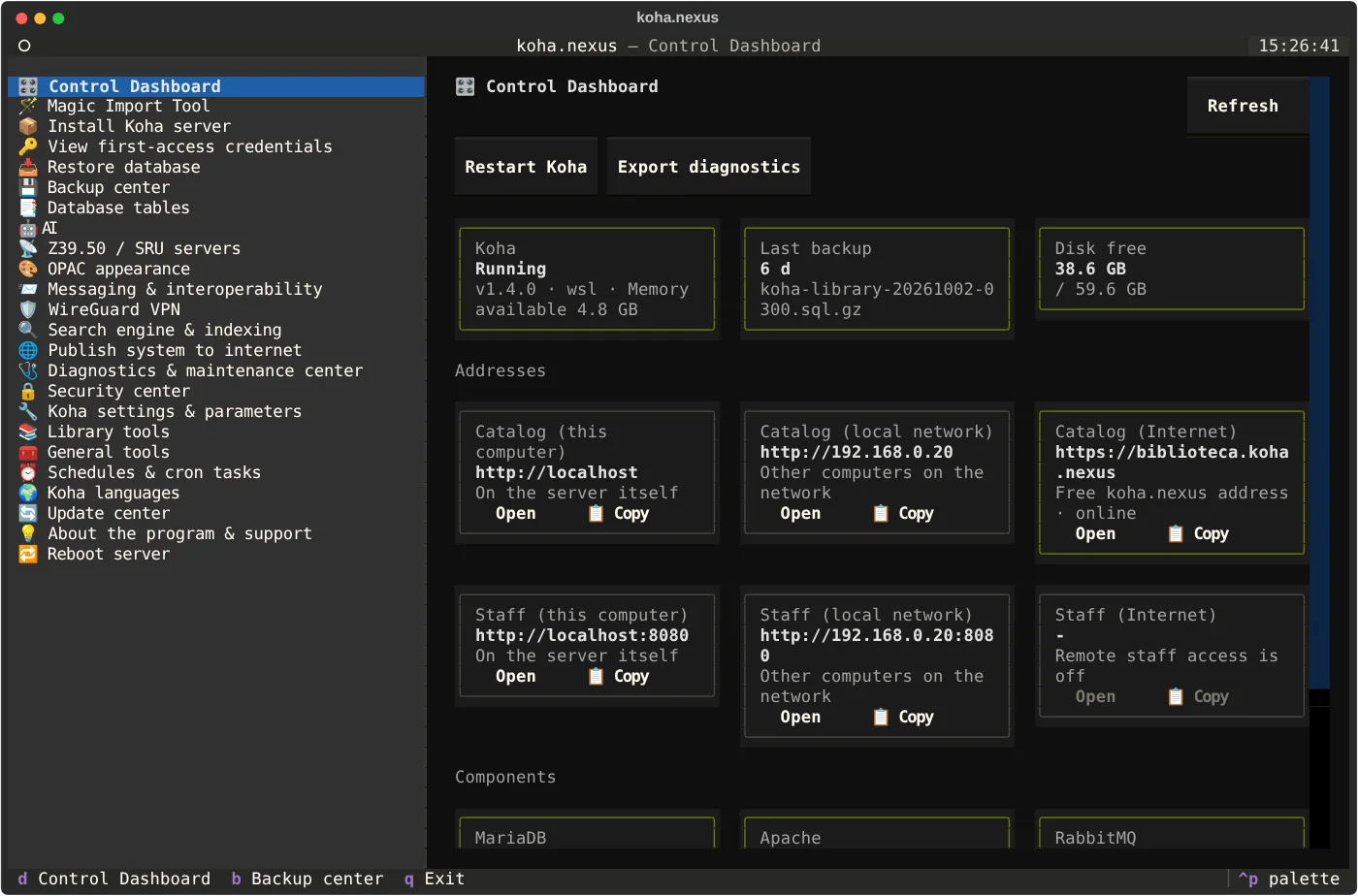
Run sudo config.sh and the panel opens full screen: a live dashboard, cards you click, shortcut keys and a command palette (ctrl+p). These are real screenshots of the panel.
 Explore in the interactive manual
Koha's state, the last backup, free disk and every address of the catalog and the staff interface (this computer, the local network and the internet), each with Open and Copy buttons.
E-mail, WhatsApp & Telegram, SMS, SIP2 and Z39.50 on one screen. Links open the exact Koha staff page, a Gmail cheat sheet fills the SMTP form, and a SIP2 form writes SIPconfig.xml for the self-check machine.
Public catalogues by region plus a community list. The scan runs a real search on each server and keeps only those that return a valid MARC record, ranked by speed.
The public catalogue's look in one click: frosted glass or brushed metal, rounded corners, a wallpaper, logo, a light/dark switch and a New arrivals carousel with real covers. A backup is taken first.
A private WireGuard network for the staff: add a phone or laptop, scan its QR code, and the staff interface and SSH work from anywhere. Split tunnel only: the device's own internet is untouched.
Every scheduled job with a switch, how often and the time, instead of a text editor. Lines written by hand are kept and the old file is saved first.
AI cataloguing from photos of the cover and title page, and an assistant on Koha's staff home page that answers in plain language and changes data only after Approve & Execute.
Restoring the database now lives only here, next to the MARC21 export and the backup routines: the main menu no longer has a separate Restore database option. Download the latest backup to this PC, restore the database from a backup (tested first, with a safety copy of the current one), export the MARC21 records with one button, test a backup in a temporary database and copy it to Google Drive, OneDrive, MEGA or S3, step by step.
The project targets Debian 11/12/13 or Ubuntu 22.04/24.04 on amd64 or arm64 architecture, and can also run on Windows via WSL 2.
Download the current installer script and run it with administrative privileges.
wget https://raw.githubusercontent.com/PauloFBaldiFH/koha.nexus/refs/heads/main/installer
sudo bash installer
You can also keep translation files alongside the script to work offline.
git clone https://github.com/PauloFBaldiFH/koha.nexus.git
cd koha.nexus
sudo bash installer
http://SERVER-IP:8080http://SERVER-IP:80sudo config.shThe Windows edition is designed for small libraries, training, and evaluation, keeping Koha services inside Debian on WSL 2 while offering native Windows tools.
Right-click the Start button and choose Terminal (Admin) or Windows PowerShell (Admin), then click Yes. Paste the command above and press Enter.
Restart your PC and repeatedly press the setup key as soon as the screen turns on:
Inside the BIOS, find Intel Virtualization Technology (VT-x) or AMD SVM / AMD-V, switch it to Enabled, and press F10 to save.
Can't access BIOS via keys? In Windows, go to Settings → System → Recovery → Advanced startup (Restart now) → Troubleshoot → Advanced options → UEFI Firmware Settings.
Verifies a compatible Windows version, 64-bit architecture, memory, free space, and BIOS virtualization.
Installs WSL 2, prepares Debian, and configures the administrative user and systemd.
Installs Koha inside Debian and creates Windows shortcuts, scheduled tasks, and control tools.
Configures access for other computers on the local network and tests ports 80 and 8080.
Start, Stop, Restart, status, diagnostics, index rebuild, and safe shutdown are accessible without opening a console.
Crashes, recoveries, backups, low disk space, and unclean shutdowns trigger native Windows alerts.
Exports logs and useful information for support, securely removing passwords, tokens, and keys.
Koha is shut down in stages before WSL and Windows power off to prevent data corruption.
The dashboard tools utilize Koha's own mechanisms and follow a strict protection flow with locking, previewing, confirmation, and verified backups before any data is altered.
A single entry point for spreadsheets, MARC files, compressed archives, collections, items, patrons, and circulation data.
Allows reverting a batch import in a controlled manner, preserving catalog integrity.
Read-only reports for loans, overdues, acquisitions, missing barcodes, items never borrowed, and lost items.
Moves patrons between categories using criteria defined by the library, with a dry run before execution.
Runs catalog inconsistency checks without altering the actual records.
Anonymizes old borrowing histories and securely deletes expired patrons that meet defined criteria.
PRE-* copy before making changes.As funcionalidades de localização são opcionais: nada é ativado automaticamente durante a instalação ou por agendamento.
| Recurso | O que oferece | Proteção |
|---|---|---|
| Validação de CPF | Auditoria de CPFs usando dígitos verificadores e identificação de números duplicados. | Leitura apenas |
| Etiquetas Pimaco | Modelos prontos para folhas A4 e Carta, incluindo lombada, código de barras e título. | PRE-ETIQUETAS |
| Ficha Catalográfica | Gera fichas no padrão nacional integradas diretamente na visualização do registro. | PRE-FICHA |
| Feriados Brasileiros | Feriados nacionais e datas móveis, com opção para inserir os municipais. | PRE-CALENDARIO |
| Relatórios de Censo | Indicadores baseados nos dados do Koha para MEC, INEP, IBGE e SNBP. | PRE-CENSO |
| ABNT NBR 6023:2018 | Geração de referências e bibliografias a partir dos registros MARC21 em HTML e texto. | Leitura apenas |
The dashboard centralizes recurring tasks and highlights important points for maintenance, diagnostics, and recovery.
| When | Task |
|---|---|
| Daily 23:00 | Compressed SQL backup and optional cloud upload |
| Sundays 03:00 | MARC21 export |
| Daily 01:30 | Session and Zebra queue cleanup |
| Daily 05:00 | Plack restart |
| Every 2 min | Zebra indexer watchdog |
| Every 5 min | Elasticsearch watchdog, when used |
/root/koha_credentials.txt — initial credentials/var/backups/koha_sql — SQL backups/var/backups/koha_marc — MARC backups/etc/koha-easy-install/ — dashboard settings/var/log/koha-easy-install/ — dashboard and validation logs~/importar — input folder for the Magic Import ToolThe dashboard gathers status, health checks, Apache logs, deep database maintenance, and ready-to-use reports for support.
The project includes verification after an unclean reboot, creates a new backup, and updates the index when necessary. On Windows, the safe shutdown routine attempts to stop Koha gracefully before the system shuts down.
uninstall.sh script permanently removes Koha, databases, local backups, and configurations. Backup your data off-server before using it.Explore the public catalogs maintained by our partner institutions. Search engines follow these links to automatically discover and index their collections.
Live list from the koha.nexus networkThe project includes tests, translations, collaboration tools, and installer checksum verification for automatic updates.
Bats test suite for backup/restore, indexing, library tools, WSL, and Windows components.
Versioned dictionaries by language, coverage validation, and automatic rejection of translations missing variables.
The installer uses SHA-256 to securely validate its own updates.
GNU General Public License v3.0 or later (GPL-3.0-or-later). The project can be used, studied, shared, and modified. Modified distributions must remain under GPL and make the corresponding source code available. The software is provided without warranty.

Questions, ideas, a library that wants to join the network or a Z39.50 server worth adding to the list: write here and the answer reaches your e-mail.